
Who is this guide for?
USAHS Faculty, Instructors, and support staff.
What does this guide help with?
This guide will review the following setting in Respondus Lockdown Browser and how it works.
Setting Review - Lock students into browser until exam is completed
Respondus already blocks students from accessing other websites and programs. Respondus does not need this additional setting to do so. What this setting does do is prevent students from exiting the exam early, except for clicking the submit button (so long as the password is not shared). It is not recommended to use this setting for any exam, especially one that is proctored remotely.
The Nitty Gritty details of this setting
With the password setting enabled, when a student tries to exit the exam early, they receive the following message:
The student will be unable to exit the exam early.
Should the student want to exit the exam early, they will need to use the proctor exit and will require the password. They need to click the “I” at the top of the page, then click proctor exit and enter the password:
Enter Password:
This will allow the student to exit the exam. If the exam has not yet been submitted, they can re-enter the exam whenever they want. As the instructor, you would be unable to track these exits. They would appear on the Respondus results, but it would not be flagged.
If you have the Password setting unchecked or disabled, when students click the X they can close the browser, then enter a reason for exiting the exam:
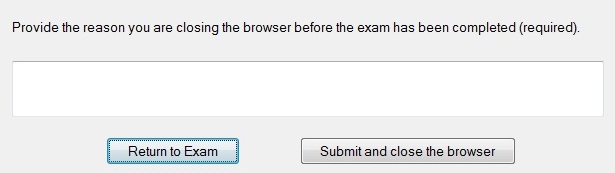
The exit reason is reviewable by the instructor, here’s an example:
If the student uses an exit password, there’s no notification when the student has entered or exited the exam.
When and how should I use this setting?
If the intended use is to lock students into their attempt so they can’t leave, even to exit early, then this setting can be used. In this instance, the password would not be shared. If you are sharing the password, it just adds confusion and uncertainty for the student.
Otherwise, this setting is meant for in person classrooms with a proctor.
Comments
Please sign in to leave a comment.